Run function workers with brokers
Pulsar Functions and connectors execute user-provided code by design. This intended capability is not itself a remote code execution (RCE) vulnerability. Run only code that you fully trust, because it can modify its execution environment:
- Thread and process runtimes can read or modify any files and state accessible to the process they run in.
- The Kubernetes runtime does not, on its own, restrict access to Kubernetes cluster resources. Pulsar provides hooks for custom hardening, but the hardening itself is outside the project.
The following diagram illustrates the deployment of function workers running along with brokers.
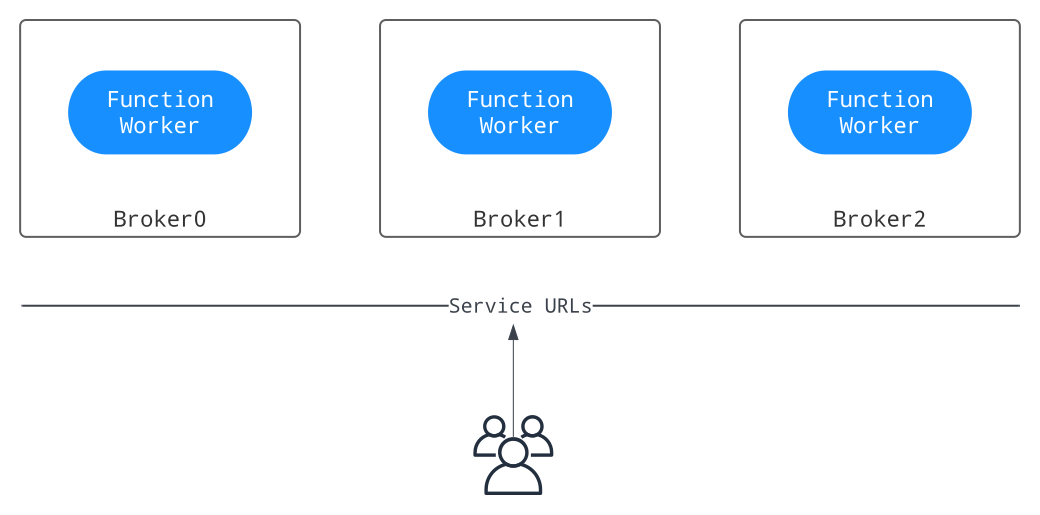
The Service URLs in the illustration represent Pulsar service URLs that Pulsar client and Pulsar admin use to connect to a Pulsar cluster.
To set up function workers to run with brokers, complete the following steps:
Step 1: Enable function workers to run with brokers
In the conf/broker.conf file (conf/standalone.conf for Pulsar standalone), set functionsWorkerEnabled to true.
functionsWorkerEnabled=true
Step 2: Configure function workers to run with brokers
In the run-with-brokers mode, most settings of function workers are inherited from your broker configuration (for example, configuration store settings, authentication settings, and so on). You can customize other worker settings by configuring the conf/functions_worker.yml file based on your needs.
- To ensure high availability in a production deployment (a cluster with multiple brokers), set
numFunctionPackageReplicasto equal the number of bookies. The default value1is only for one-node cluster deployment. - To initialize distributed log metadata in runtime (
initializedDlogMetadata = true), ensure that it has been initialized by thebin/pulsar initialize-cluster-metadatacommand.
When authentication is enabled on the BookKeeper cluster, you need to configure the following authentication settings for your function workers.
bookkeeperClientAuthenticationPlugin: the authentication plugin name of BookKeeper client.bookkeeperClientAuthenticationParametersName: the authentication plugin parameters of BookKeeper client, including names and values.bookkeeperClientAuthenticationParameters: the authentication plugin parameters of BookKeeper client.
Step 3: Start function workers to run with brokers
Once function workers are configured properly, you can start the brokers (function workers are running with the brokers).
To verify whether each worker is running or not, you can use the following command.
curl <broker-ip>:8080/admin/v2/worker/cluster
If a list of active function workers is returned, it means they have been started successfully. The output is similar to the following.
[{"workerId":"<worker-id>","workerHostname":"<worker-hostname>","port":8080}]