Load balance across brokers
Pulsar is a horizontally scalable messaging system, so the traffic in a logical cluster must be balanced across all the available Pulsar brokers as evenly as possible, which is a core requirement.
You can use multiple settings and tools to control the traffic distribution which requires a bit of context to understand how the traffic is managed in Pulsar. Though in most cases, the core requirement mentioned above is true out of the box and you should not worry about it.
The following sections introduce how load-balanced assignments work across Pulsar brokers and how you can leverage the framework to adjust. Pulsar ships two load managers: the modular load manager (loadManagerClassName=org.apache.pulsar.broker.loadbalance.impl.ModularLoadManagerImpl, the default) and the extensible load manager (org.apache.pulsar.broker.loadbalance.extensions.ExtensibleLoadManagerImpl). Unless a setting is marked otherwise, this page applies to both; the differences are explained in Broker load balancing | Types and moving from one to the other in Broker load balancing | Migration.
The pulsar-admin commands on this page are thin wrappers around the admin REST API; every operation shown here can be called directly from your own automation, see Automate with the REST API.
Dynamic assignments
Topics are dynamically assigned to brokers based on the load conditions of all brokers in the cluster. The assignment of topics to brokers is not done at the topic level but the bundle level (a higher level). Instead of individual topic assignments, each broker takes ownership of a subset of the topics for a namespace. This subset is called a bundle and effectively this subset is a sharding mechanism.
In other words, each namespace is an "administrative" unit and sharded into a list of bundles, with each bundle comprising a portion of the overall hash range of the namespace. Topics are assigned to a particular bundle by taking the hash of the topic name and checking in which bundle the hash falls. Each bundle is independent of the others and thus is independently assigned to different brokers.
The benefit of the assignment granularity is to amortize the amount of information that you need to keep track of (see Namespace bundles for what a bundle costs). Based on CPU, memory, traffic load, and other indexes, topics are assigned to a particular broker dynamically. For example:
- When a client starts using new topics that are not assigned to any broker, a process is triggered to choose the best-suited broker to acquire ownership of these topics according to the load conditions.
- If the broker owning a topic becomes overloaded, the topic is reassigned to a less-loaded broker.
- If the broker owning a topic crashes, the topic is reassigned to another active broker.
For partitioned topics, different partitions are assigned to different brokers. Here "topic" means either a non-partitioned topic or one partition of a topic.
Create namespaces with assigned bundles
When you create a new namespace, a number of bundles are assigned to the namespace. You can set this number in the conf/broker.conf file:
# When a namespace is created without specifying the number of bundles, this
# value will be used as the default. Default is 32 since 5.0.0 (was 4).
defaultNumberOfNamespaceBundles=32
Alternatively, you can override the value when you create a new namespace using Pulsar admin:
bin/pulsar-admin namespaces create my-tenant/my-namespace --clusters us-west --bundles 64
With the above command, you create a namespace with 64 initial bundles. Therefore the topics for this namespace can immediately be spread across up to 64 brokers.
In general, if you know the expected traffic and number of topics in advance, you had better start with a reasonable number of bundles instead of waiting for the system to auto-correct the distribution.
On the same note, it is beneficial to start with more bundles than the number of brokers, due to the hashing nature of the distribution of topics into bundles. For example, for a namespace with 1000 topics, using something like 64 bundles achieves a good distribution of traffic across 16 brokers. Bundles that no topic has been looked up in cost nothing, so a generous count does not penalize small namespaces.
The pulsar/system namespace and public/default are created by pulsar initialize-cluster-metadata with their own bundle counts (--system-namespace-bundle-number, 64 by default, and --default-namespace-bundle-number, 32 by default). For the complete picture, including what a bundle costs and how to size the system namespace for transaction coordinators, see Namespace bundles.
Split namespace bundles
Since the load for the topics in a bundle might change over time and predicting the load might be hard, bundle split is designed to resolve these challenges. The broker splits a bundle into two and the new smaller bundles can be reassigned to different brokers.
Pulsar supports the following bundle split algorithms (see Bundle splitting algorithms for the details):
range_equally_divide(the default): split the bundle into two parts with the same hash range size.topic_count_equally_divide: split the bundle into two parts with the same number of topics.specified_positions_divide: split the bundle into several parts by the specified positions.flow_or_qps_equally_divide: split the bundle into two parts with the same message rate or throughput.
- The
specified_positions_dividealgorithms only support use by admin API and do not support set intodefaultNamespaceBundleSplitAlgorithm. - Splits are permanent: bundles can be split but not merged. See Namespace bundles for how to choose the initial number of bundles so that fewer splits are needed.
To enable bundle split, you need to configure the following settings in the broker.conf file, and set defaultNamespaceBundleSplitAlgorithm based on your needs.
loadBalancerAutoBundleSplitEnabled=true
loadBalancerAutoUnloadSplitBundlesEnabled=true
defaultNamespaceBundleSplitAlgorithm=range_equally_divide
You can configure more parameters for splitting thresholds. Any existing bundle that exceeds any of the thresholds is a candidate to be split. By default, the newly split bundles are immediately reassigned to other brokers, to facilitate the traffic distribution.
# maximum topics in a bundle, otherwise bundle split will be triggered
loadBalancerNamespaceBundleMaxTopics=1000

# maximum sessions (producers + consumers) in a bundle, otherwise bundle split will be triggered
loadBalancerNamespaceBundleMaxSessions=1000

# maximum msgRate (in + out) in a bundle, otherwise bundle split will be triggered
loadBalancerNamespaceBundleMaxMsgRate=30000

# maximum bandwidth (in + out) in a bundle, otherwise bundle split will be triggered
loadBalancerNamespaceBundleMaxBandwidthMbytes=100

# maximum number of bundles in a namespace (for auto-split)
loadBalancerNamespaceMaximumBundles=128
Shed load automatically
The support for automatic load shedding is available in the load manager of Pulsar. The leader broker periodically compares the load of the brokers and, when the configured shedding strategy decides that the distribution is uneven, "unloads" some bundles from the brokers that carry too much so that they get reassigned to brokers that carry less. Which brokers count as too loaded, how many bundles are moved and where they go depends on the strategy.
- The automatic load shedding is enabled by default. To disable it, set
loadBalancerSheddingEnabledtofalse. The setting is dynamic, so you can also pause shedding temporarily withpulsar-admin brokers update-dynamic-config, for example during a rolling restart. - Besides the automatic load shedding, you can manually unload bundles.
Additional settings that apply to shedding:
# Load shedding interval. Broker periodically checks whether some traffic should be offload from
# some over-loaded broker to other under-loaded brokers
loadBalancerSheddingIntervalMinutes=1

# Prevent the same topics to be shed and moved to other brokers more than once within this timeframe
loadBalancerSheddingGracePeriodMinutes=30
The strategy is selected with loadBalancerLoadSheddingStrategy. The modular load manager supports the following strategies:
- AvgShedder (the default since Pulsar 5.0)
- ThresholdShedder (the default from Pulsar 2.10 to 4.x)
- OverloadShedder
- UniformLoadShedder
The extensible load manager uses TransferShedder.
- From Pulsar 5.0, the default shedding strategy of the modular load manager is
AvgShedder, paired withAvgShedderas the placement strategy (loadBalancerLoadPlacementStrategy). From Pulsar 2.10 to 4.x, the default wasThresholdShedderwithLeastLongTermMessageRateplacement. - You need to restart brokers if the shedding strategy is dynamically updated.
AvgShedder
This strategy pairs the most loaded broker with the least loaded broker and moves bundles from the former to the latter once the difference between their resource usage scores has exceeded a threshold for several consecutive checks: loadBalancerAvgShedderLowThreshold (15 points) for loadBalancerAvgShedderHitCountLowThreshold (8) checks, or loadBalancerAvgShedderHighThreshold (40 points) for loadBalancerAvgShedderHitCountHighThreshold (2) checks. The repeated checks filter out short load spikes; the larger the difference, the sooner the strategy acts, which is what makes it settle a cluster quickly after a rolling restart or after adding brokers.
AvgShedder also plans the destination of every bundle it unloads, so that the placement of the bundle cannot undo the shedding decision. For this, it must be configured as both the shedding and the placement strategy, which is the default:
loadBalancerLoadSheddingStrategy=org.apache.pulsar.broker.loadbalance.impl.AvgShedder
loadBalancerLoadPlacementStrategy=org.apache.pulsar.broker.loadbalance.impl.AvgShedder

# Share of the load difference between the two brokers to move in one cycle. 0.5 equalizes the pair.
maxUnloadPercentage=0.5
If you configure one of the classic shedding strategies below while leaving loadBalancerLoadPlacementStrategy at its default, the broker falls back to the LeastLongTermMessageRate placement strategy that those shedding strategies were paired with before Pulsar 5.0 and logs a warning. For the details of the algorithm, see AvgShedder in the load balancing concepts.
ThresholdShedder
This strategy sheds bundles from brokers whose resource usage exceeds the average resource usage of brokers in the cluster by a specified threshold.
Current usage for a broker is defined as the maximum usage among CPU, direct memory, throughput in and throughput out values. This value is exponentially smoothed out with historical observations to yield the computed resource usage for broker load balancing purposes.
A broker is considered overloaded if its resource usage exceeds the average resource usage of all brokers in the cluster by at least threshold value loadBalancerBrokerThresholdShedderPercentage. Bundles from overloaded brokers are transferred until the expected throughput of the broker is 5% below the cluster average. Furthermore, a broker must have a total current throughput (in + out) sufficiently high in order to be eligible for bundle unloading. If the expected throughput reduction on the broker does not exceed absolute value loadBalancerBundleUnloadMinThroughputThreshold, it will not be unloaded.
Note that recently unloaded bundles are not unloaded again.
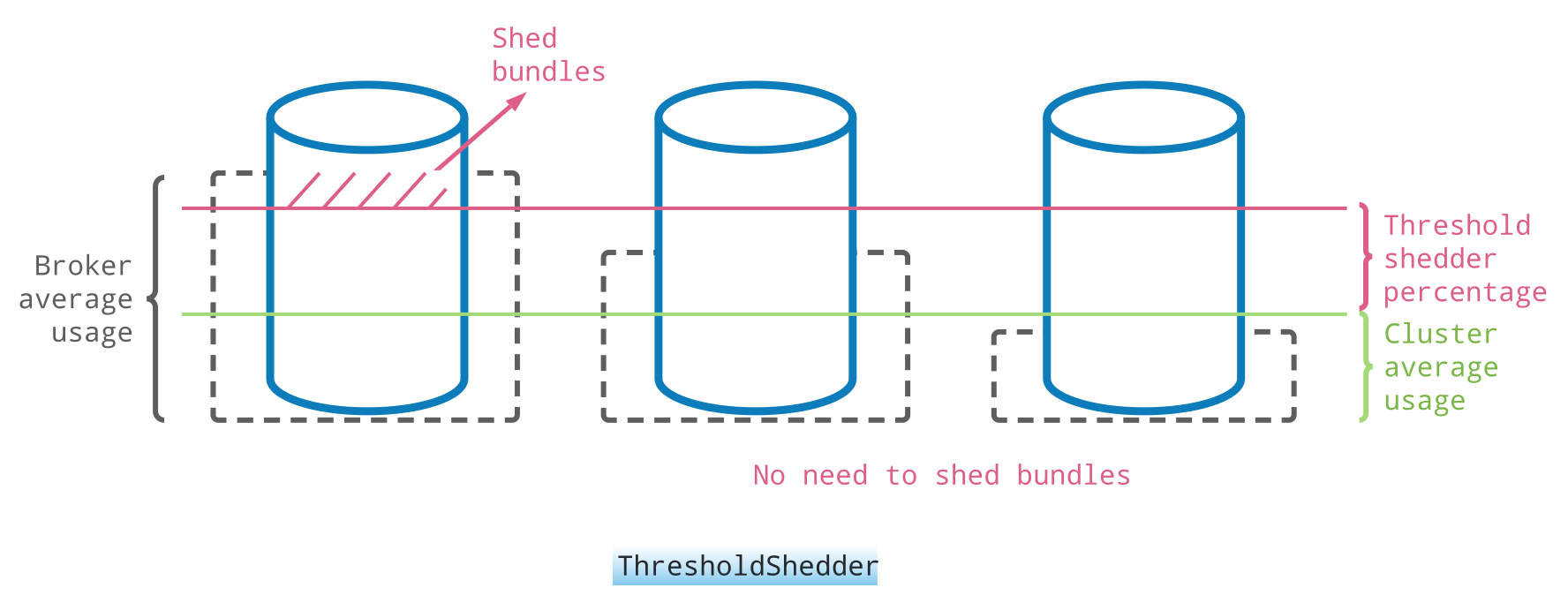
For example, assume you have three brokers, the average broker usage of broker1 is 40%, the average broker usage of broker2 and broker3 is 10%, then the cluster average usage is 20% ((40% + 10% + 10%) / 3). If you set loadBalancerBrokerThresholdShedderPercentage to 10, then only broker1's certain bundles get unloaded, because the average usage of broker1 is greater than the sum of the cluster average usage (20%) plus loadBalancerBrokerThresholdShedderPercentage(10%).
However, in some special cases, the above default strategy cannot leverage the resources of low-load or idle machines.
For example:
There are 11 brokers, of which 10 are loaded at 80% and 1 is loaded at 0%. The average load is 80% * 10 / 11 = 72.73%, and the threshold to unload is 72.73% + 10% = 82.73%. Since 80% < 82.73%, unload will not be triggered, and there is one idle Broker with load of 0%.
To leverage the resources of low-load or idle machines, you can configure the lowerBoundarySheddingEnabled parameter on top of ThresholdShedder.
When lowerBoundarySheddingEnabled is set to true, a leader decides the lower boundary of the load.
If current usage is less than average usage - lower boundary load, e.g., 0% < (82.73% - 10%), the broker with the highest load will be triggered to unload.
To use the ThresholdShedder strategy, configure brokers with this value.
loadBalancerLoadSheddingStrategy=org.apache.pulsar.broker.loadbalance.impl.ThresholdShedder
You can configure the weights for each resource per broker in the conf/broker.conf file.
# The BandWithIn usage weight when calculating new resource usage. The range is between 0 and 1.0.
loadBalancerBandwithInResourceWeight=1.0

# The BandWithOut usage weight when calculating new resource usage. The range is between 0 and 1.0.
loadBalancerBandwithOutResourceWeight=1.0

# The CPU usage weight when calculating new resource usage. The range is between 0 and 1.0.
loadBalancerCPUResourceWeight=1.0

# The heap memory usage weight when calculating new resource usage. The range is between 0 and 1.0.
loadBalancerMemoryResourceWeight=1.0

# The direct memory usage weight when calculating new resource usage. The range is between 0 and 1.0.
loadBalancerDirectMemoryResourceWeight=1.0
OverloadShedder
This strategy attempts to shed exactly one bundle on brokers which are overloaded, that is, whose maximum system resource usage exceeds loadBalancerBrokerOverloadedThresholdPercentage. To see which resources are considered when determining the maximum system resource. A bundle is recommended for unloading off that broker if and only if the following conditions hold: The broker has at least two bundles assigned and the broker has at least one bundle that has not been unloaded recently according to LoadBalancerSheddingGracePeriodMinutes. The unloaded bundle will be the most expensive bundle in terms of message rate that has not been recently unloaded. Note that this strategy does not take into account "underloaded" brokers when determining which bundles to unload. If you are looking for a strategy that spreads load evenly across all brokers, see ThresholdShedder.
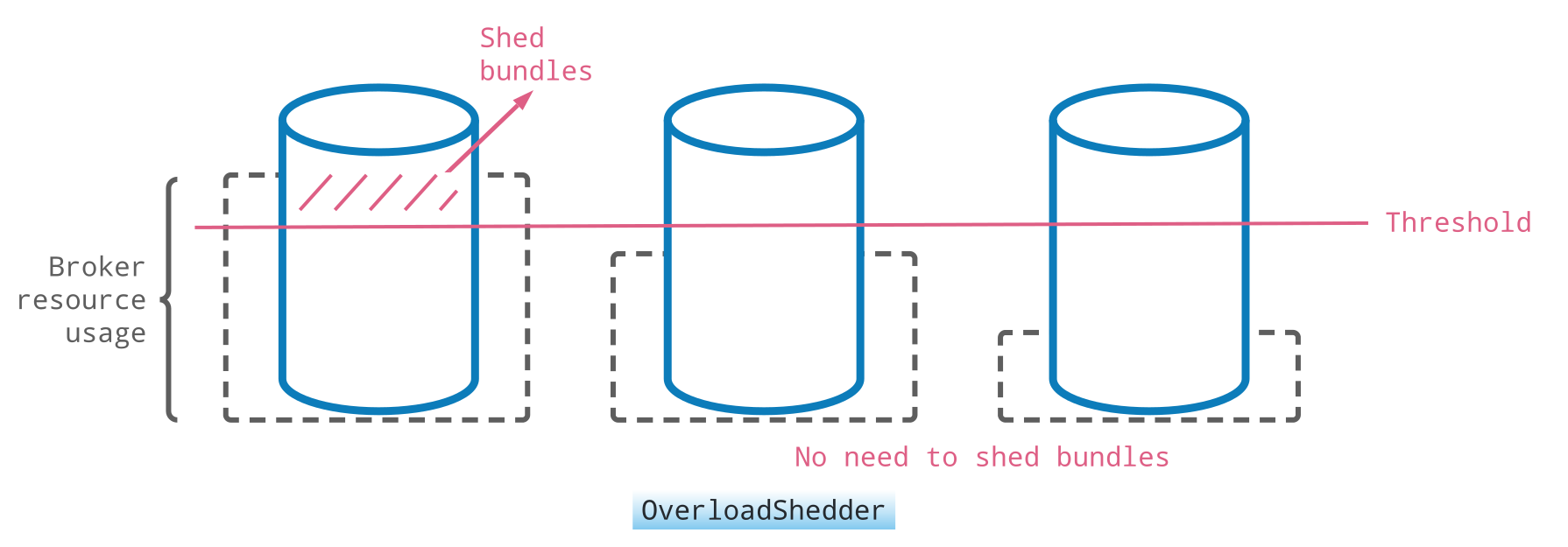
To use the OverloadShedder strategy, configure brokers with this value.
loadBalancerLoadSheddingStrategy=org.apache.pulsar.broker.loadbalance.impl.OverloadShedder
Broker overload thresholds
The determination of when a broker is overloaded is based on the threshold of CPU, network, and memory usage. Whenever either of those metrics reaches the threshold, the system triggers the shedding (if enabled).
The overload threshold loadBalancerBrokerOverloadedThresholdPercentage only applies to the OverloadShedder shedding strategy. By default, it is set to 85%.
Pulsar gathers the CPU, network, and memory usage stats from the system metrics. In some cases of network utilization, the network interface speed that Linux reports is not correct and needs to be manually overridden. This is the case in AWS EC2 instances with 1Gbps NIC speed for which the OS reports 10Gbps speed.
Because of the incorrect max speed, the load manager might think the broker has not reached the NIC capacity, while in fact the broker already uses all the bandwidth and the traffic is slowed down.
You can set loadBalancerOverrideBrokerNicSpeedGbps in the conf/broker.conf file to correct the max NIC speed. When the value is empty, Pulsar uses the value that the OS reports.
UniformLoadShedder
This strategy tends to distribute load uniformly across all brokers. This strategy checks the load difference between the broker with the highest load and the broker with the lowest load. If the difference is higher than configured thresholds loadBalancerMsgRateDifferenceShedderThreshold and loadBalancerMsgThroughputMultiplierDifferenceShedderThreshold then it finds out bundles that can be unloaded to distribute traffic evenly across all brokers.
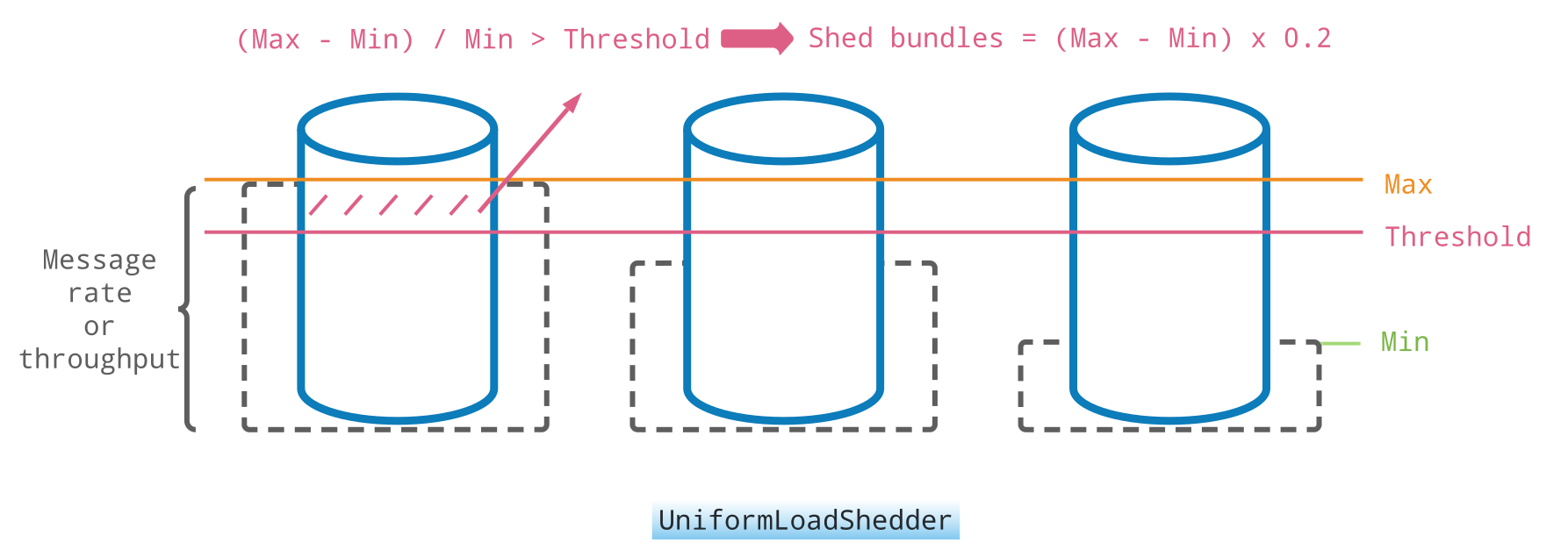
To use the UniformLoadShedder strategy, configure brokers with this value.
loadBalancerLoadSheddingStrategy=org.apache.pulsar.broker.loadbalance.impl.UniformLoadShedder
TransferShedder
This strategy is the default of the extensible load manager and is only available there. It transfers bundles from the most loaded broker to the least loaded broker until the standard deviation of the broker loads is below loadBalancerBrokerLoadTargetStd (0.25), and it pre-assigns the destination broker of every bundle it unloads so that clients reconnect to the new owner without a lookup. After a transfer it waits loadBalanceSheddingDelayInSeconds (180) before the next unloading cycle, and it does not run while any registered broker has not yet published its load data.
loadManagerClassName=org.apache.pulsar.broker.loadbalance.extensions.ExtensibleLoadManagerImpl
loadBalancerLoadSheddingStrategy=org.apache.pulsar.broker.loadbalance.extensions.scheduler.TransferShedder
For the details, see TransferShedder in the load balancing concepts.
Unload topics and bundles
You can "unload" a topic in Pulsar manual admin operations. Unloading means closing topics, releasing ownership, and reassigning topics to a new broker, based on the current load.
When unloading happens, the client experiences a small latency blip, typically in the order of tens of milliseconds, while the topic is reassigned.
Unloading is the mechanism that the load manager uses to perform the load shedding, but you can also trigger the unloading manually, for example, to correct the assignments and redistribute traffic even before having any broker overloaded.
Unloading a topic has no effect on the assignment, but just closes and reopens the particular topic:
pulsar-admin topics unload persistent://tenant/namespace/topic
To unload all topics for a namespace and trigger reassignments:
pulsar-admin namespaces unload tenant/namespace
To move one bundle to a broker of your choice, for example when draining a broker before a restart:
pulsar-admin namespaces unload tenant/namespace --bundle 0x00000000_0x08000000 --destinationBroker broker-2.example.com:8080
Distribute anti-affinity namespaces across failure domains
When your application has multiple namespaces and you want one of them available all the time, you can group them into an anti-affinity group so that the load manager distributes them across different failure domains and brokers. See Anti-affinity namespaces.
Related topics
- Namespace bundles: how many bundles a namespace gets, what they cost and how to size them.
- Rolling restarts: what happens to the bundles of a broker when it stops, and how to keep the load balancer from reacting to every restart.
- Broker load balancing | Concepts: assignment, splitting and unloading in detail, including every shedding strategy.
- Broker load balancing | Types: modular versus extensible load manager.